Showing posts with label Straight Images. Show all posts

Monday, 24 April 2017

Shoot Nine Straight Images


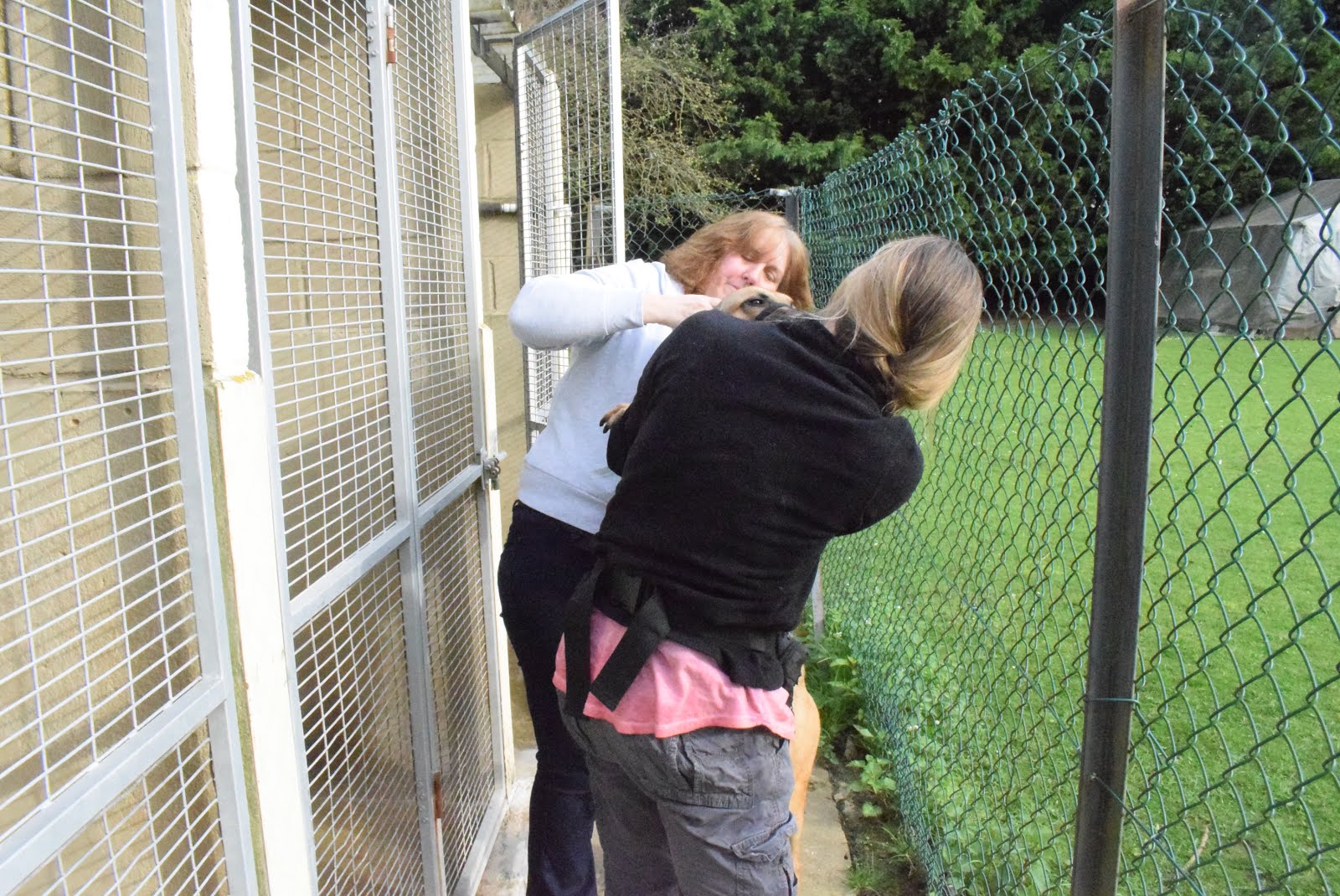
These images I took to show two volunteers working together to try to put a lead on one of the more excitable dogs so he can be taken out to get some exercise. 


There was some maintenance work being done painting the kennel walls and using wire brushes to remove dirt from the wire doors. So I captured this work being done. 


I captured images of a worker measuring some medication to be administered to one of the dogs.


I captured in freeze frame the water with disinfectant in it being thrown on to the floor of the outside run which will then be scrubbed clean with brushes

I selected these two images below to develop using Photoshop.


I combined the two images to make a composite image, but made one of the layers pin light to create this ffect.


I was happy with the effect produced above so repeated the procedure with two more images, where Hades was getting excited about going to the paddock and couldn't keep still.


I combined the images but made one layer pin light. This was in order to show the chaos of the dog jumping all over the place as the volunteers tried to attach his lead.


In Photoshop I removed colour from the background. Then I used selective colour and adjusted the colours to make the volunteers faces seem more red to highlight that a lot of effort had been put into getting the dog ready to be taken to the paddock. This also affected other areas making the colours more vivid.

Shoot Eight Straight Images


In this shoot I tried to improve upon my image of a dog, Tom,  being fed his dinner through the door hatch to its run.


I took some more images of the workers looking after the donkeys and sheep trying to get more interesting and captivating images.


A stray dog was handed in found wandering the streets. He was identified by his microchip and was 19 years old and was very frightened and was shaking. I captured an image of a volunteer giving him cuddles to stop him shaking. Fortunately the relieved and grateful owner came and collected him within an hour.


This is an image showing how vigilant you have to be when working at the Centre. The dogs there can be very clever and have learned how to push the kennel doors so that they bounce back and they can then get their noses in and push them open. This image shows Bart in the process of doing this and trying to get out to play.


I wanted to take an image where the dog dominated the frame and was the complete focus of attention, as the photographer Graeme Williams does in some of his images. I therefore took this image zoomed in close up to Niebla so that it became more personal and intimate but not so much that it was too intrusive. I also took the image as though it was from the perspective of the level of the dogs eyes so that it was more like what he would be seeing. It can insinuate that humans are on the same level as dogs are. We are not superior to them as people seem to think. So this image may encourage them to think of dogs as equals rather than toys that we can do what we want to. If this was the view that people had, then we would find fewer cases of abuse and neglect of dogs. I also felt that this would give an insight to the viewer of what the dog was seeing and would help them to identify and bond with the dog. This would help them understand why the volunteers and staff care for the animals so much.


I made a simple change to this image using Photoshop. By just increasing the brightness I focused more on the protective pose that the shaking dog is being held in. It also makes both the volunteers face and the subject more visible and the expression more easy to see. The brighter image also creates a more appropriate mood showing the affection the dog is receiving as the darker image could appear a bit more sad and depressing.


The light in the kennel block is not very good for taking images so when I took this image of Bart trying to escape the image was quite dark and you cannot see his eye very well. To improve the image I used Photoshop to decrease the contrast and increase the brightness so that now Bart's face is not so shadowed and now more visible to the viewer. Also the slightly orange region on the wall is reduced making it less distracting.

Shoot Seven Straight Images


I started the shoot taking an image of the early morning long shadows as a volunteer arrives at Mutts  in the morning to illustrate the long hours that are put into caring for the animals there. The entrance lane is quite pretty so I thought it would also illustrate how nice it is to work in such a landscape.


I then spent time in the paddock and the kennels taking images capturing the affection that the volunteers feel for the dogs. Taking images of them clapping the dogs and giving them treats as well as making eye contact with them.


Some of the puppies have arrived from Romania but were not used to people and were rather frightened. I captured an image of one of the braver pups coming towards me to take a treat from my hand. The other pup was too timid to come near me. This image shows the time that must be spent working with the pups to get them confident around people.


This image shows the strength that is needed to put a lead onto one of the more energetic dogs. He is so excited that he cannot stay still long enough to get a lead attached to his collar and it takes two people to hold him still to get this done so that he can be walked over to the paddock.


I selected two images to modify in Photoshop. I wanted to focus on capturing movement in these images, to underline the amount of time the staff spend exercising the dogs to keep them fit and happy, as well as training them to interact appropriately with people.

I decided to create two composites images, using the images I had taken in the paddock of the dogs running after balls that the volunteers had thrown for them. Firstly I went through the images and selected the ones with the best positions of the dog and the volunteer that I wanted to use.

 
In Photoshop I combined the freeze frame images of the subjects to create this composite image. I feel this image captures the movement of both the volunteer and the dog as they play fetch together. This image feels more dynamic and full of energy than the individual freeze frame images and this will help the viewer visualise the motion in the activity as well as the fun being had and energy being expended.


I also had taken a series of images in a photo burst that I wanted to use.


I wanted to create something a little different to the previous composite image but captures motion in a more dramatic way. So I experimented with how I could present this, then I selected some of the images from above that I felt  would work best in my composite image. To achieve this effect I deleted the background of almost all of the images, then I combined the images but I changed the layers to screen, which produced an effect so that it appears as if the dog is running so fast that it is only possible to capture a pale shadow of where he has been. Also, I made it so that the volunteer was in the same place which could have made it look as though she wasn't moving as much, however, all these layers create an effect where it looks as though she is moving so fast she cannot be seen, like she is moving at the speed of light.  The multiple images of the subjects also indicates that this activity is one that is done many times.